
You can update maintenance reminders or delete maintenance reminders.
Update a Maintenance Reminder
When service has been performed on a vehicle, update the reminder for the next service.
To update a reminder:
- From the Search Results tab or Maintenance tab, click the reminder that you want to edit.
- From the Maintenance Card, click Update.
- Update the Next Service value:
- If an Interval value is set, click Reset to automatically calculate the Next Service mileage and/or hours value(s) by adding the chosen interval value to the vehicle’s current odometer and/or run time.
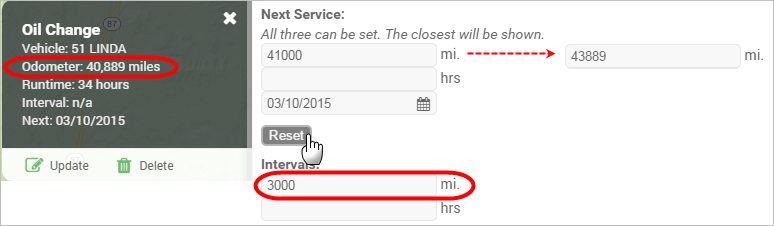
- If an Interval value is not set, enter a free-form value for miles, hours, or date for the next service.
- Click Save.
Delete a Maintenance Reminder
When you delete a maintenance reminder, any service reminder alerts that are based on that vehicle will still remain active.
To delete a reminder:
- From the Search Results tab or Maintenance tab, click the reminder that you want to delete.
- From the Maintenance Card, click Delete.
- In the Delete Maintenance pop-up window, click OK.