The Camera Media page in the Fleet Tracking Portal is designed to provide a centralized and focused repository of camera video clips from Driveri, Drive360, and AIR II cameras. Camera event clips are plotted on the map and you can access metadata about the vehicle’s behavior reported during the media clip’s timeframe.
Note: You must have the Camera Media permission enabled to see the Camera Media Library page in the Portal.
Accessing the Camera Media Page
To access the Camera Media Page, click the camera icon from the left-hand navigation bar in the Fleet Tracking Portal.
Filtering Camera Event Clips
You can filter camera event clips by event type, fleet subset, and time frame. Any filtering selections made are applied automatically.
Event Types
To filter by event type, click the Event type button and check the boxes next to the applicable type(s).
Note: Available event types vary depending on the camera, Driveri vs. AIR II/Drive360. If you filter by an event that is unavailable for your camera, you will not see any clips listed in the Results List.
Dangerous driving Distracted Driver initiated Drowsiness Follow distance Good driving Hard acceleration
Hard brake Hard turn Manual request Potential incident Seatbelt Speeding Violation
Fleet Subset
By default, the fleet subset selected is "Group" > "All Vehicles." To filter by fleet subset, click the expand button in the drop-down and click the applicable subset.
Note: The Hierarchy feature is available to Enterprise customers and customers with the Advanced Administration add-on. If you are interested in this feature, please contact your Account Manager.
Vehicle Group Vehicle Hierarchy Vehicle Driver
Time Frame
By default, the time frame displayed is "Today." To select a different time frame, click the expand button in the drop-down and click the application option to make your selection.
Today Yesterday Last 7 days
Last 30 days This month Custom range
Viewing the Results List
The Results list of camera clips displays entries based on selected filtering options. Each clip included in the list displays the vehicle label, clip name (editable), time of the day for the clip, and the type of clip event.
Note: If the clip was requested manually, the entry in the Results list displays a designation of "Manual."
You can adjust the display appearance of the Results list by clicking on the Expanded List icon. If you'd like to return to the default display appearance, click the Collapsed List icon.
Please see Using the Camera Page for step-by-step instructions on how to use each feature available from the Camera Media Page.
[post_title] => About the Camera Media Page
[post_excerpt] =>
[post_status] => publish
[comment_status] => closed
[ping_status] => closed
[post_password] =>
[post_name] => about-the-camera-media-page
[to_ping] =>
[pinged] =>
[post_modified] => 2026-08-07 13:28:00
[post_modified_gmt] => 2026-08-07 20:28:00
[post_content_filtered] =>
[post_parent] => 0
[guid] => https://help.gpsinsight.com/?post_type=documentation&p=31953
[menu_order] => 0
[post_type] => documentation
[post_mime_type] =>
[comment_count] => 0
[filter] => raw
)
[1] => WP_Post Object
(
[ID] => 27097
[post_author] => 12
[post_date] => 2023-05-05 09:32:16
[post_date_gmt] => 2023-05-05 16:32:16
[post_content] => The Fleetio integration pushes your DTC, odometer/runtime, secondary meter, and vehicle location data from [whitelabel_name] to Fleetio. This integration automatically captures telematics data, making it easier to keep up with preventive maintenance and respond quickly to vehicle issues from Fleetio.
Data sync occurs once a day in the following manner:
- Odometer & Engine Hours: Nightly
- Location: Every 6 hours
- DTCs: Near real-time
Integration Benefits
Manage preventive maintenance and diagnostics trouble codes within Fleetio from the [whitelabel_name] integration
Automatically view odometer readings and secondary meter runtime data for any vehicle with an additional meter within Fleetio
PTO data is not available.
View asset location, driving status, and more in the vehicle profile screen
Configuring the Integration
The below instructions are for Enterprise customers only. Standard customers must contact their Account Managers to configure this integration.
Use the below instructions to set up the Fleetio integration.
Before starting, ensure the vehicles' VINs in the GPS portal matches the VINs in the Fleetio system. Additionally, you must generate a new API token from the Fleetio system (from the Fleetio main menu > API Keys).
From the Classic Portal, click the Account menu, click Manage Webhooks, and click Open.
The Webhook Manager opens in a new browser tab.
Under Available Integrations, click the green plus sign () next to Fleetio.
The Fleetio integration window appears.
Enter the required properties for the integration:
Update Location: Select the box to integrate location updates (optional).
Update Odometer: Select the box to integrate odometer updates (optional).
Update Secondary Meter: Select the Runtime option to integrate secondary meter updates (optional).
Diagnostic Trouble Codes: Select the box to integrate DTCs (optional).
Click Add.
The third party integration(s) are assigned an ID and appears in the 3rd Party Integrations grid. There will be a separate ID for each integration type (e.g., Fleetio Odometer, Fleetio DTC, etc.). Additional information is provided for Status and Queue Depth. An option to delete the integration(s) is also available.
[post_title] => About the Fleetio Integration
[post_excerpt] =>
[post_status] => publish
[comment_status] => closed
[ping_status] => closed
[post_password] =>
[post_name] => about-the-fleetio-integration
[to_ping] =>
[pinged] =>
[post_modified] => 2024-07-16 12:49:48
[post_modified_gmt] => 2024-07-16 19:49:48
[post_content_filtered] =>
[post_parent] => 0
[guid] => https://help.gpsinsight.com/?post_type=documentation&p=27097
[menu_order] => 0
[post_type] => documentation
[post_mime_type] =>
[comment_count] => 0
[filter] => raw
)
[2] => WP_Post Object
(
[ID] => 33343
[post_author] => 12
[post_date] => 2025-11-24 12:06:47
[post_date_gmt] => 2025-11-24 19:06:47
[post_content] =>
GPS Insight and Coast have partnered to help fleets streamline their operations through seamless data integration. By connecting the two platforms, Coast can use GPS Insight location data to validate fuel transactions automatically. If a vehicle is not within a set distance of the fueling location at the time of purchase, the transaction can be flagged for review.
This guide walks you through the process of preparing your GPS Insight account, generating the required Coast API key, and completing the integration.
1. Prepare Your GPS Insight Account
Before connecting to Coast, you will need a dedicated GPS Insight user for the integration.
Create a dedicated user in the GPS Insight Portal (Example username:simplytransit.coast).
Ensure the dedicated user has restricted vehicle access and permissions for API use only (this increases security and ensures the integration only has access to the vehicles you choose).
Once the user is created, you’re ready to move into the Coast portal.
2. Generate a Coast API Key
Log in to your Coast account and navigate to "Integrations."
Select Apps.
On the GPS Insight tile, click Open.
Click API Keys in the Need an API Key? box.
Click New API Key at the top-right corner of the screen.
Name the key "GPS Insight Key" then click Next.
Coast will generate an API Key. Click Copy & Close to save it.
3. Add the API Key to the GPS Insight Integration
Return to the previous Coast API Key tab.
Paste the API key you copied.
Click Next.
4. Connect Your GPS Insight Account
A "Connect to GPS Insight Account" prompt will appear; click Connect.
Click Continue when prompted.
Enter the GPS Insight username and password for the dedicated Coast integration user you created earlier.
Click Login to complete authentication.
5. Finalize the Integration
Click Sync Now to trigger an immediate sync.
Enable Automatically Sync New Vehicles to ensure new GPS Insight vehicles are added automatically.
Your Integration Is Complete!
Coast will now use GPS Insight vehicle location data to validate fueling transactions in real-time. Any transaction occurring outside the approved proximity to a fuel pump can be automatically flagged for review—enhancing both security and control across your fleet.
Customers with Epicor have an on-premises BisTrack server implementation. With our integration, their server's address is configured as a destination for location alerts from our Portal. This custom setup needs to be done once before they start pushing alerts to their BisTrack server.
How to Set Up EPICOR Integration
Send a request to your Epicor account representative asking for "Geo-Fence push notifications be enabled."
Epicor reaches out to our team directly with the details needed for the integration.
Our team completes the setup and confirms it directly with Epicor. This typically takes 1–2 business days from when Epicor makes the request.
Match your vehicles in BisTrack (see Matching Vehicles in BisTrack below).
Configure Landmark Alerts in the Portal. Enter the word PUSH in the Email Notification field (the addresses field in Classic) for each alert covering the vehicles and landmark groups you want reported to BisTrack.
The integration is complete. As alerts are generated in our Portal, the configured alerts will be sent directly to your Epicor BisTrack server.
Matching Vehicles in BisTrack
For BisTrack to update a Delivery from a GPS Fleet Tracking alert, it needs to find the matching vehicle. BisTrack looks up vehicles using the Registration field.
The Registration value on each BisTrack Vehicle must be an exact match to the VIN registered with us. Extra spaces, missing characters, or a license plate number in place of the VIN will prevent the match.
To confirm your vehicles are matched:
In BisTrack, open the Audit Log.
For each VIN listed, open or create the matching Vehicle in BisTrack and update the Registration field to the exact VIN.
Look for entries that read "No vehicle found in BisTrack with registration [VIN]."
📝 Note: If a listed vehicle is not used on BisTrack Deliveries, no action is needed.
The integration is complete. As alerts are generated in the Portal, the configured alerts are sent directly to your Epicor BisTrack server.
How Deliveries are Updated
Once a vehicle is matched and assigned to a Delivery in the correct status, BisTrack automatically updates that Delivery when a Landmark Alert is triggered.
Need help?
For BisTrack Vehicle setup or Delivery operations: Submit an EpicCare Case, and BisTrack Support will assist.
For Landmark Alerts or Portal questions: Contact GPS Fleet Tracking Support.
The Camera Media page provides a centralized location for managing camera clips. From this page, you can filter, view, rename, download, and request additional media clips. You can also view your clip quota and see when it will reset.
Viewing Camera Event Clips
Camera media appears in a list on the left side of the Camera Media page. You can use filters to narrow the results and quickly locate the footage you need.
Varies by camera/plan, but may include: Distracted Driver Initiated Drowsiness Follow Distance Positive Driving Hard Acceleration Hard Brake Hard Turn Phone Usage Potential Incident Seatbelt Speeding Violation Camera Obstruction Stop Sign Violation
Timeframe
Today (default) Yesterday Last 7 days Last 30 days This month Custom Range
Note: The Hierarchy feature is available only to Enterprise or Advanced Administration add-oncustomers. If you’re interested in learning more, please contact your Account Manager.
To clear Event Type filters, simply click the X to clear all selected filters, or you may click the Event Type drop-down to uncheck the box for specific filters. Additionally, an Undo button is available to reverse the most recent selection of the Event Type filter.
You may use the drop-downs for Entity Type, entity, and timeframe to adjust your selections.
How to View Camera Clips
You can view camera clips from the Camera Media page.
From the Camera Media page, locate the clip you would like to view by using the filters and/or scrolling through the list of camera clips.
(Skip this step if you have FAIO Pro Plus) Click Request Clip next to the camera event you would like to request.
A request is sent to the camera to transmit the video. Once the video is available, the icon is updated to a Play icon.
Click the Play icon for the clip you would like to view.
A pop-up window opens, and the event playback automatically starts.
Click the Full Screen icon to view the video in Full View. The following actions are also available:
Unmute: Unmute the video (muted by default) to hear audio.
Playback Rate: Change the playback speed (1x, available).
Pause: Stop the video during playback.
📝 Note: Within Full View mode (not Split View), you can click and drag in the video to see different angles.
Managing Camera Clips
You can rename and/or download clips from the Camera Media page. Additionally, you can request more media from a clip to initiate a Manual Clip Request.
From the Camera Media page, locate the camera clip you would like to manage by using the filters and/or scrolling through the list of camera clips.
From the Clip entry, click the Overflow button to access additional options:
Rename
Enter a name for the clip in the Clip name field (optional).
📝 Note:If you leave Clip name blank, the clip appears as “Untitled” in the media library. You can rename it later.
Click Save.
Download
Click the Overflow button from the Fullscreen video playback, then click Download.
You can also download the clip from the playback pop-up by clicking the Download icon.
Request More Media
Complete the available fields in the Request Media pop-up, then click Request Media.
Requesting Media Manually
You can request camera footage from a vehicle for a specific date/time that is not connected with an auto-generated camera event. This access is helpful if you are looking into customer complaints or need to check on activity before or after a camera event.
How to Request Media Manually:
From the Camera Media page, click Request media from the left-hand List panel.
The Request media pop-up appears. In the bottom-left corner, the pop-up displays your current clip quota, allowing you to quickly see your available clips.
Note: Requested manual clips count toward your account quota.
Use the drop-down under “Vehicle” to select the applicable vehicle.
Enter a name for the clip in the Clip name field (optional).
📝 Note:If you leave Clip name blank, the clip appears as “Untitled” in the media library. You can rename it later.
Under “Start Date”, select a date using the calendar picker.
Under “Start Time”, use the time picker to select a time or click Now.
Use the Duration drop-down to select the clip duration (30 seconds or 1 minute).
📝 Note: A 30-second clip counts as 1 clip toward your quota, whereas a 1-minute clip counts as 2 clips toward your quota.
Click Request Media.
A message is shown toward the top-right of the screen to confirm the clip was requested successfully.
After a clip request is submitted, it may take some time for the video to appear in the list of clips while the Portal updates and the camera responds. Manually requested media clips are delineated from auto-generated camera events in the Media Results list with a “Manual” designation.
Note: Requested clips remain available in the GPS Fleet Tracking Portal for 90 days from the original requestdate. Media is stored based on available capacity, and older files may be overwritten when the SD card becomes full.
Viewing Event Clip Quotas
The Camera Media page offers an at-a-glance display of your event clip quotas. If you have a combination of Driveri and Drive360/AIR II, quotas between these two types are shown separately.
To see when your quota resets, hover your mouse over the quota. A pop-over will appear showing the number of days until the next reset.
[post_title] => Using the Camera Media Page
[post_excerpt] =>
[post_status] => publish
[comment_status] => closed
[ping_status] => closed
[post_password] =>
[post_name] => using-the-camera-media-page
[to_ping] =>
[pinged] =>
[post_modified] => 2026-11-02 06:51:17
[post_modified_gmt] => 2026-11-02 13:51:17
[post_content_filtered] =>
[post_parent] => 31953
[guid] => https://help.gpsinsight.com/?post_type=documentation&p=31979
[menu_order] => 0
[post_type] => documentation
[post_mime_type] =>
[comment_count] => 0
[filter] => raw
)
[5] => WP_Post Object
(
[ID] => 31696
[post_author] => 12
[post_date] => 2024-11-22 11:21:35
[post_date_gmt] => 2024-11-22 18:21:35
[post_content] => [whitelabel_name] and Whip Around have partnered to simplify fleet management by enabling seamless integration between the two platforms. This integration allows Whip Around to pull critical fleet data from [whitelabel_name], including vehicle location, history, and diagnostic trouble code (DTC) data. To initiate the integration, you will need to generate an App Token from within the [whitelabel_name] Portal.
What is an App Token? An App Token is the most secure method for authenticating API access without exposing your login credentials. It acts as an alias for your credentials, enabling you to retrieve a session token securely. This authentication method is ideal for scenarios where you want to avoid passing sensitive login details through HTTP requests or sharing your portal credentials with third-party vendors. Additionally, access granted through the App Token can be revoked or modified any time.
Generating an App Token
Standard Tier Customers: Please contact your Account Manager or Support team to request the creation of an App Token for the Whip Around integration.
Pro/Enterprise Customers: Follow the steps below to generate your own App Token:
Log in to the [whitelabel_name] Portal.
From the Explore page, click Manage Users.
From the Manage Users and Groups page, click Third-Party Access to API V2 Functions.
In the API Apps List grid, click the API App button next to Create New.
In the New API App window, enter an App Name and Description, then click Save API App.
A new App Token will be generated.
Benefits of Using an App Token
The App Token authentication method offers several advantages:
It does not grant access to the [whitelabel_name] Portal
It can be easily changed or deactivated by an admin user
App usage can be monitored and tracked
Password changes will not affect the API flow, unlike regular login credentials
Limiting Vehicle Access for API Users - If you do not want the API to have access to all vehicles in your fleet, we recommend creating a dedicated Whip Around user with restricted vehicle access and permissions for API use only. For example, you can create a user named simplytransit.whiparound specifically for API access. This way, you can ensure that only specific vehicles and data are accessible to Whip Around.
Completing the Integration Setup
Once you have your App Token, along with the [whitelabel_name] username, copy, and paste it into the Whip Around integration setup page to complete the connection.
From the left column, click Integrations.
Under [whitelabel_name], select Activate.
Enter your [whitelabel_name] username and App Token.
Click Submit.
Vehicle Data Synchronization
For Whip Around to correctly match your [whitelabel_name] vehicle data with the Whip Around portal, ensure that vehicles in both systems have matching VINs assigned. This will allow the data to sync accurately between the two platforms.
[post_title] => Whip Around Integration
[post_excerpt] =>
[post_status] => publish
[comment_status] => closed
[ping_status] => closed
[post_password] =>
[post_name] => whip-around-integration
[to_ping] =>
[pinged] =>
[post_modified] => 2024-11-22 13:11:31
[post_modified_gmt] => 2024-11-22 20:11:31
[post_content_filtered] =>
[post_parent] => 0
[guid] => https://help.gpsinsight.com/?post_type=documentation&p=31696
[menu_order] => 0
[post_type] => documentation
[post_mime_type] =>
[comment_count] => 0
[filter] => raw
)
)
[post_count] => 6
[current_post] => -1
[before_loop] => 1
[in_the_loop] =>
[post] => WP_Post Object
(
[ID] => 31953
[post_author] => 12
[post_date] => 2025-02-07 08:28:16
[post_date_gmt] => 2025-02-07 15:28:16
[post_content] =>
The Camera Media page in the Fleet Tracking Portal is designed to provide a centralized and focused repository of camera video clips from Driveri, Drive360, and AIR II cameras. Camera event clips are plotted on the map and you can access metadata about the vehicle’s behavior reported during the media clip’s timeframe.
Note: You must have the Camera Media permission enabled to see the Camera Media Library page in the Portal.
Accessing the Camera Media Page
To access the Camera Media Page, click the camera icon from the left-hand navigation bar in the Fleet Tracking Portal.
Filtering Camera Event Clips
You can filter camera event clips by event type, fleet subset, and time frame. Any filtering selections made are applied automatically.
Event Types
To filter by event type, click the Event type button and check the boxes next to the applicable type(s).
Note: Available event types vary depending on the camera, Driveri vs. AIR II/Drive360. If you filter by an event that is unavailable for your camera, you will not see any clips listed in the Results List.
Dangerous driving Distracted Driver initiated Drowsiness Follow distance Good driving Hard acceleration
Hard brake Hard turn Manual request Potential incident Seatbelt Speeding Violation
Fleet Subset
By default, the fleet subset selected is "Group" > "All Vehicles." To filter by fleet subset, click the expand button in the drop-down and click the applicable subset.
Note: The Hierarchy feature is available to Enterprise customers and customers with the Advanced Administration add-on. If you are interested in this feature, please contact your Account Manager.
Vehicle Group Vehicle Hierarchy Vehicle Driver
Time Frame
By default, the time frame displayed is "Today." To select a different time frame, click the expand button in the drop-down and click the application option to make your selection.
Today Yesterday Last 7 days
Last 30 days This month Custom range
Viewing the Results List
The Results list of camera clips displays entries based on selected filtering options. Each clip included in the list displays the vehicle label, clip name (editable), time of the day for the clip, and the type of clip event.
Note: If the clip was requested manually, the entry in the Results list displays a designation of "Manual."
You can adjust the display appearance of the Results list by clicking on the Expanded List icon. If you'd like to return to the default display appearance, click the Collapsed List icon.
Please see Using the Camera Page for step-by-step instructions on how to use each feature available from the Camera Media Page.
The GPS portal is capable of sending and receiving integration data using a variety of secure methods, such as Application Programming Interfaces (APIs) and webhooks (event-based push). This data exchange saves considerable time by automating time-consuming, manual tasks. Examples include:
Preventative Maintenance – Odometer and DTC data sent to an asset management system.
Programmatic Registration – On-boarded or removed vehicle data sent to the GPS portal.
Driver Assignment – Driver assignment or user data from SAP or an asset management system to the GPS portal.
Landmark Creation – Job data from SAP to the GPS portal.
Payroll Validation – Hours vehicles spend on jobsites sent to SAP.
Fuel Spend Aggregation – Fuel card data sent to SAP or an asset management system.
An application programming interface (API) specifies how software components interact with each other. The portal's API communicates via XML or JSON to push your fleet's data (e.g., odometer reading, location, engine hours) from our system to your back-end systems (e.g., ERP, Dispatch, CRM).
Webhooks are part of our API and offer a simple way to get events in our system—such as a vehicle's location or a vehicle entering a landmark—pushed to your system as they occur. We push data by making an HTTP POST to a URL you've configured with us for an event.
In addition to APIs and webhooks for custom integration projects, you can leverage integrations already set up for specific purposes, such as fuel card integration, Multispeak, and third-party providers like ServiceTitan and Fleetio.
More details about our API v2, including step-by-step instructions and example requests/responses, are available at gpsinsight.com/apidocs. Customers can also contribute to our API documentation via GitHub.
How to Add an Integration
The following section provides information on how to add an integration to the GPS Fleet Tracking software system from the Advanced Administration (Classic) Portal.
Please ask your account manager if you're looking for a specific integration not listed below. Some providers require a signed release form for permission to transfer location data.
To configure ServiceTitan integration:
You must complete a ServiceTitan API Authorization Form and send it to your ServiceTitan representative, who will then provide the required API key.
Click the user profile in the top right, then click Settings.
From the list of Integrations, click Gps.
Click Add Provider.
In the Account Details tab (Edit Gps Provider form), choose the provider name (GPS Insight), enter the AccountId of your GPS account, and click Save.
Click the Devices tab, add your vehicles using their VIN, and click Save. Ensure the vehicle VIN in the GPS portal matches the VIN entered here.
From the portal, click the More menu, then click Integrations.
Click Add Integration.
From the list of Available Integrations, click Service Titan.
Enter the API Key provided by ServiceTitan.
Click Save.
When you click the integration, additional information is provided for Status and Total Messages, along with an option to delete the integration. Integration should go live within a few minutes — check the Dispatch menu in ServiceTitan to see updated vehicle locations as they report.
To configure Fleetio integration:
Before starting, ensure the vehicles' VINs in the GPS portal match the VINs in the Fleetio system. You'll also need to generate a new API token from Fleetio (main menu > API Keys).
From the portal, click the More menu, click Integrations, and click Add Integration.
Under Available Integrations, click the Fleetio button.
Enter the required properties in the Edit Integration window:
API Key – Enter the API key provided by Fleetio.
Account Id – Enter the Account ID provided by Fleetio.
Update Odometer – Select to integrate odometer updates (optional).
Diagnostic Trouble Codes – Select to integrate DTCs (optional).
Click Save.
The Fleetio integration displays in the list of current integrations for your account.
Generate reports on all fuel card transactions to calculate MPG data, flag activity where a vehicle wasn't present for an associated purchase, and identify non-fuel purchases.
Requires an API Key and Account ID. Optionally select Update Odometer and/or Diagnostic Trouble Codes.
Terminal
Insurance Telematics Data Partner
Requires customer opt-in and a secure, account-scoped API token. Access is read-only and can be revoked at any time. Connecting does not guarantee carrier approval or insurance discounts.
TruckerCloud
Insurance Telematics Data Partner
Requires customer opt-in and a secure, account-scoped API token. Access is read-only and can be revoked at any time. Connecting does not guarantee carrier approval or insurance discounts.
[/whitelabel]
[post_title] => About Integrations
[post_excerpt] => The GPS portal is capable of sending and receiving integration data using a variety of secure methods, such as Application Programming Interfaces (APIs) and webhooks (event-based push). This data exchange saves considerable time by automating time-consuming, manual tasks.
[post_status] => publish
[comment_status] => closed
[ping_status] => closed
[post_password] =>
[post_name] => about-integrations
[to_ping] =>
[pinged] =>
[post_modified] => 2026-08-24 18:44:16
[post_modified_gmt] => 2026-08-25 01:44:16
[post_content_filtered] =>
[post_parent] => 0
[guid] => http://gpsihelp.wpengine.com/?post_type=documentation&p=545
[menu_order] => 14
[post_type] => documentation
[post_mime_type] =>
[comment_count] => 0
[filter] => raw
)
[1] => WP_Post Object
(
[ID] => 871
[post_author] => 12
[post_date] => 2016-01-11 15:47:40
[post_date_gmt] => 2016-01-11 15:47:40
[post_content] => An application programming interface (API) specifies how some software components should interact with each other. The portal's API provides a form of communication via XML or JSON coding language to push your fleet’s data (e.g., odometer reading, location, engine hours, etc.) from our system to your back-end systems (e.g., ERP, Dispatch, CRM). By using our API you can effortlessly integrate your fleet’s data into your back-end systems to provide transparency into payroll, fuel card transactions, additional documentation, asset management, and more.
Please create an API user with the appropriate vehicle access and permissions to use for APIs only. Password changes break the API data from flowing. For tokens, using an API App offers the following benefits: It does not allow access to the Portal site, it can be changed or deactivated by admin users, and app usage can be better tracked.
[well]
Think of our API as a pantry full of ingredients. All you have to do is create the recipes! [/well]
More details about our API v2, including step-by-step instructions and example requests/responses, are available here: https://apidocs.gpsinsight.com/#/.
Did you know that our customers can contribute to our API documentation? If they have examples of interesting implementations, they can submit them via GitHub.
Specific Integrations
Some API integrations have already been defined. To extend the kitchen analogy, the recipe for these types of integrations has not only been created, but the dish is served up and fully baked for you.
Dossier DCloud
GPS Insight integration with Dossier provides Odometer and Engine Hours (automatic updating of meter data) and Diagnostic Trouble Codes (automatic import and processing of vehicle DTCs to create a work request).
To set up units and schedule them for data transmission:
Configure each on-board unit that will receive GPS data by selecting the desired services on the Dossier On-Board tab of the Unit Control Form.
After a unit is configured to receive GPS data, click the Unit Info tab, and then click External Identifiers.
In the External Identifier window, identify the external identifier to use (e.g., Meter Readings or DTCs), and then add the Serial Number from the GPS device. You can create an external identifier entry for each type; both use the same Serial Number for the unit.
Under the Configuration menu, open the Scheduler.
Under the Schedule Configuration tab, select the [Provider] Enabled check box.
Populate the User Name and App Token fields from the GPS portal.
To obtain an App Token, log into the GPS portal. From the Menu Bar, hover over the Account menu, point to Manage Users, and click Third-party access to api V2 functions. In the API Apps List grid, click API App next to Create New. In the New API App window, enter an App Name and Description, and click Save API App. A new App Token is generated. For more information about app tokens, refer to the API documentation.
The content and instructions included in this article pertain to the Classic Portal.
Customer sites provides an API functionality that allows you to embed the HTML for a map with specific vehicle groups and/or landmarks on your own web server for visibility outside of the portal. Additionally, a KML flat file is provided via link for external integrations (e.g., ArcGIS). This feature allows your customers to view limited information about your vehicle locations without requiring the viewers to log in.
In order to use Customer Sites, you must have the Customer Sites item enabled in the Menu Access List (Custom category).
Example
Company XYZ wants to post vehicle locations for their delivery vehicles on their public website so their customers can see when a delivery truck is in their zone.
To create and share a customer site:
From the portal, click the More menu, click Customer Sites, and click Open.
The Manager Customer Sites page opens in a new browser tab.
In the Customer Site List grid, click Customer Site next to Create New.
In the New Customer Site window, enter the name of the site, and click Create Site.
The list of vehicles that belong to this customer site appears (no vehicles have yet been added).
From the right pane, CTRL + click to select the vehicle group(s) you want to add, and click Add.
Click Save Changes.
In the Customer Site List grid, click the Share icon next to the site.
In the Shared Link / HTML grid, copy the shared link OR copy and paste the HTML code in the box to your server to embed the map into your website.
To create and share a customer site for external integrations:
Follow steps #1-6 provided under To create and share a customer site.
Click on the link in the box next to KML:.
A flat file containing the KML downloads for you to use in an external integration.
[post_title] => Customer Sites
[post_excerpt] => Customer sites provides an API functionality that allows you to embed the HTML for a map with specific vehicle groups and/or landmarks on your own web server for visibility outside of the portal.
[post_status] => publish
[comment_status] => closed
[ping_status] => closed
[post_password] =>
[post_name] => using-customer-sites
[to_ping] =>
[pinged] =>
[post_modified] => 2025-07-30 09:27:00
[post_modified_gmt] => 2025-07-30 16:27:00
[post_content_filtered] =>
[post_parent] => 545
[guid] => http://gpsihelp.wpengine.com/?post_type=documentation&p=1338
[menu_order] => 2
[post_type] => documentation
[post_mime_type] =>
[comment_count] => 0
[filter] => raw
)
[3] => WP_Post Object
(
[ID] => 24732
[post_author] => 12
[post_date] => 2022-04-20 09:27:50
[post_date_gmt] => 2022-04-20 16:27:50
[post_content] =>
Customers with Epicor have an on-premises BisTrack server implementation. With our integration, their server's address is configured as a destination for location alerts from our Portal. This custom setup needs to be done once before they start pushing alerts to their BisTrack server.
How to Set Up EPICOR Integration
Send a request to your Epicor account representative asking for "Geo-Fence push notifications be enabled."
Epicor reaches out to our team directly with the details needed for the integration.
Our team completes the setup and confirms it directly with Epicor. This typically takes 1–2 business days from when Epicor makes the request.
Match your vehicles in BisTrack (see Matching Vehicles in BisTrack below).
Configure Landmark Alerts in the Portal. Enter the word PUSH in the Email Notification field (the addresses field in Classic) for each alert covering the vehicles and landmark groups you want reported to BisTrack.
The integration is complete. As alerts are generated in our Portal, the configured alerts will be sent directly to your Epicor BisTrack server.
Matching Vehicles in BisTrack
For BisTrack to update a Delivery from a GPS Fleet Tracking alert, it needs to find the matching vehicle. BisTrack looks up vehicles using the Registration field.
The Registration value on each BisTrack Vehicle must be an exact match to the VIN registered with us. Extra spaces, missing characters, or a license plate number in place of the VIN will prevent the match.
To confirm your vehicles are matched:
In BisTrack, open the Audit Log.
For each VIN listed, open or create the matching Vehicle in BisTrack and update the Registration field to the exact VIN.
Look for entries that read "No vehicle found in BisTrack with registration [VIN]."
📝 Note: If a listed vehicle is not used on BisTrack Deliveries, no action is needed.
The integration is complete. As alerts are generated in the Portal, the configured alerts are sent directly to your Epicor BisTrack server.
How Deliveries are Updated
Once a vehicle is matched and assigned to a Delivery in the correct status, BisTrack automatically updates that Delivery when a Landmark Alert is triggered.
Need help?
For BisTrack Vehicle setup or Delivery operations: Submit an EpicCare Case, and BisTrack Support will assist.
For Landmark Alerts or Portal questions: Contact GPS Fleet Tracking Support.
[post_title] => EPICOR/BisTrack Integration
[post_excerpt] =>
[post_status] => publish
[comment_status] => closed
[ping_status] => closed
[post_password] =>
[post_name] => epicor-bistrack-integration
[to_ping] =>
[pinged] =>
[post_modified] => 2026-10-05 06:32:16
[post_modified_gmt] => 2026-10-05 13:32:16
[post_content_filtered] =>
[post_parent] => 0
[guid] => https://help.gpsinsight.com/?post_type=documentation&p=24732
[menu_order] => 0
[post_type] => documentation
[post_mime_type] =>
[comment_count] => 0
[filter] => raw
)
[4] => WP_Post Object
(
[ID] => 872
[post_author] => 12
[post_date] => 2016-01-11 15:49:15
[post_date_gmt] => 2016-01-11 15:49:15
[post_content] => [whitelabel key="gpsi,smartfleet,monarch,liveviewgps,responsible,cmd"]Fuel Card Integration is available with many popular fuel card vendors. Integrating fuel card data directly into the portal gives you more control over your fuel spending and analysis. [/whitelabel]Fuel card customers can generate reports on all fuel card transactions, which allows you to calculate MPG data, see flagged activity where a specified vehicle was not present for the associated purchase transaction, and identify non-fuel purchases. The following fuel card reports are available:
Fuel Transactions – Detailed fuel card purchases to help identify fuel card fraud
Fuel Usage – Summarized fuel card usage and MPG
Mileage - Vehicle mileage and fuel transactions organized by state
Voyage Fuel Card Integration requires prior approval from executive management
Fuel Card Partner Companies
FleetCor, Voyager, and WEX have many brands of fuel cards, refer to the tabs below to see supported brands.
[tabs class="yourcustomclass"]
[tab title="FleetCor Fuel Cards" active="active"]
Universal Premium MasterCard, Fuelman Advantage Platinum MasterCard, Universal Advantage Voyager, Fuelman Advantage Local Diesel, Fuelman Commercial Advantage, Fuelman Discount Advantage, Fuelman Diesel Advantage, BP Business Solutions MasterCard, BP Business Solutions, BP Business Solutions Plus, Chevron & Texaco Universal Business MasterCard, Chevron & Texaco Business Card, Chevron & Texaco Diesel Advantage, ARCO Business Solutions, Comdata MasterCard, Comdata Proprietary, Kwik Trip Business Plus MasterCard, Kwik Trip Extended Fleet, Universal Platinum Candada MasterCard, HuskyPro MasterCard, Ultramar MasterCard, Chevron Business Card Canada
Integration is NOT available on the following cards: Pacific Pride-branded cards, Shell Fleet Navigator, CFN-branded cards, FDR.
[/tab]
[tab title="Voyager Fuel Cards"]
Beck Oil, Inc., Cenex, Christensen, Inc., Colonial Industries, Inc., Cosby Fuels, CountryMark, Cruise Americard, CSI global fleet, Davison Fuels & Oil, LLC, Downs Energy, Ed Staub & Sons Petroleum, Inc., Eugene Truck Haven (Truck N Travel), Fleet Fuels, Fuel Express, Gate Petroleum, Global Fleet, Impac Fleet, Jubitz Corporation, Lard Oil, LeasePlan USA, Mansfield Energy, Multi Service Fuel Card, P-Fleet, Pinnacle Petroleum, Parkland, Quality Oil Company, Quarles Petroleum, Reeder Distributors, Inc., Van Manen Petroleum Group, Rhoads Energy, River City Petroleum, SC Fuels, Senergy Petroleum, Sprague Energy, Stuck Enterprises, World Kinect Energy Services, Woodford Oil Company
[/tab]
[tab title="WEX Fuel Cards"]
Small & Large Business Fleet: WEX Fleet Card, WEX FlexCard, WEX Fleet Cross Roads Card, 7-Eleven Speedway Business Fleet Card, 7-Eleven Speedway Business Universal Card, Chevron and Texaco Business Access (Flex) Card, Chevron and Texaco Business Access Card, Chevron and Texaco Business Card, Circle K Fleet Card, Circle K Universal Card, CITGO Fleet Card, CITGO Fleet Select Card, CITGO Fleet Universal Card, DK Fleet Card, DK Universal Fleet Card, Exxon Mobil BusinessPro™ Card Private Label, Exxon Mobil BusinessPro™ Card Universal, GetGo® Fleet Regional Card, GetGo® Fleet Universal Card, Gulf Business Fuel Card, Gulf Commercial Fleet Services Card, Gulf Universal Fleet Card, Irving Commercial Card, Kum & Go Fleet Card, MAPCO Fleet Advantage Universal Card, Marathon Fleet Card, Marathon Universal Card, Maverik Fleet Card, Meijer Universal Fleet Card, Murphy USA Universal Card, Phillips 66® Conoco® 76® Business Fleet Card, Phillips 66® Conoco® 76® Business Universal Card, QuickChek Universal Fleet, QuikTrip Fleetmaster Card, QuikTrip Fleetmaster Plus Card, RaceTrac Elite Card, RaceTrac Universal Card, Royal Farms Fleet Card, Royal Farms Universal Card, Sheetz Business Edge Loyalty (Flex), Sheetz Business Edge Loyalty Card, Sheetz Business Edge Nationwide (Flex), Sheetz Business Edge Nationwide Card, Shell Card Business, Shell Card Business Flex™, Sinclair Fleet Track Card, Sunoco Business Fleet Card, Sunoco Fleet Universal Card, Tesoro Universal Fleet Card, Thorntons FleetWorks Card, Thorntons FleetWorks Nationwide Card, Valero Fleet Card, Valero Fleet Plus Card, Wawa Fleet Card, Wawa Flex Fleet Card, Wawa Flex Universal Card, Wawa Universal Card
Government Fleet: State of Alabama Fleet Card (AL), Sourcewell Fleet Card (Formerly NJPA Fleet Card) (AK, DE, HI, MD, MS, ND, OH, OK, SC, SD, TX, UT, VA, WV), State of Arizona Fuel Card (AZ), Arkansas Fleet Card (AR), WEX Fleet (CA, CO, CT, GA, KS, LA, ME, NE, NJ, NV, NH, NY, NC, OR, RI, TN, VT, WA, WI), State of Florida Fleet Card (FL), State of Idaho Fleet Card (ID), State of Illinois Fleet Card (IL), The State of Indiana (IN), Iowa Depoartment of Transportation Fleet Card (IA), Kentucky (KY), The Commonwealth of Massachusetts (MA), State of Michigan MiDEAL (MI), Minnesota (MN), State of Missouri (MO), State of Montana (MT), The State of New Mexico (NM), Pennsylvania (PA), Wyoming (WY)
[/tab]
[/tabs]
If you're interested in using fuel card integration, contact your Account Manager or Support. The setup process varies by fuel card provider.
WEX Fuel Card Integration
Submit Your WEX Fuel Card Integration Request
WEX - Customers of WEX fuel cards only need to forward us the following information:
[well]
COMPANY
Contact name
Contact email
WEX Account Number: XXXX-XX-XXXXXX-X
[/well]
WEX Fuel Card Integration - What Happens Next
After you submit your WEX fuel card integration request, WEX typically confirms within 24 hours that your account is enabled to send data to us. Fuel card transactions usually begin appearing in GPS Insight within a couple of days.
Important: Enter Vehicle VINs in WEX
To make sure fuel card transactions are matched to the right vehicles, enter your Vehicle Identification Numbers (VINs) in your WEX online portal.
VINs in WEX must match the VINs for your vehicles in your account.
When the VINs match, the Portal automatically pairs fuel cards with vehicles.
If a matching VIN isn’t available, you can manually match fuel card transactions to vehicles in the Portal.
Next Steps
Confirm that your vehicle VINs are entered correctly in your WEX online portal. For step-by-step help, see these articles in Related Topics below:
WEX Fuel Card Setup: Set up the WEX integration, including where to enter vehicle VINs in WEX.
[/well]
[post_title] => Fuel Card Integration
[post_excerpt] => Fuel Card Integration is available with many popular fuel card vendors.
[post_status] => publish
[comment_status] => closed
[ping_status] => closed
[post_password] =>
[post_name] => fuel-card-integration
[to_ping] =>
[pinged] =>
[post_modified] => 2026-10-20 11:04:14
[post_modified_gmt] => 2026-10-20 18:04:14
[post_content_filtered] =>
[post_parent] => 545
[guid] => http://gpsihelp.wpengine.com/?post_type=documentation&p=872
[menu_order] => 3
[post_type] => documentation
[post_mime_type] =>
[comment_count] => 0
[filter] => raw
)
[5] => WP_Post Object
(
[ID] => 870
[post_author] => 12
[post_date] => 2016-01-11 15:44:09
[post_date_gmt] => 2016-01-11 15:44:09
[post_content] => This document outlines the necessary steps to complete a successful integration of [whitelabel_name] AVL data with your Multispeak 4.0 compatible Milsoft DisSPatch OMS product and NISC with Multispeak 4.1 using AVLChangedNotification. There are a few things you need to do as a customer in the beginning, and on an ongoing basis, to ensure a successful integration. Please review the Multispeak Version 4.0 Interoperability Assertion document for more information on the pre-requisites and steps necessary to set up your integration with [whitelabel_name].
Please inform NISC that currently GPS Insight only supports the AVLChangedNotification method.
To set up the integration
In the portal, create multiple vehicle groups and evenly distribute the vehicles that will be included in the integration among those groups.
For example, if your fleet has 60 vehicles that will be part of the integration, create three vehicle groups (each containing 20 vehicles). If possible, try to evenly balance each group with comparable vehicle activity.
Do not delete these vehicle groups. Vehicles should not exist in more than one (1) of these Multispeak groups. New vehicles must be added or they will not be seen in the integration. We recommend using a Vehicle Group naming convention like the following: [Fleet Name] Vehicles Feed [Group #]. [Fleet Name] should be replaced with the name of your fleet (e.g., ABCTrucking) and [Group #] should be replaced with applicable group number (e.g., 0, 1, 2, 3, etc.).
Next, add the vehicle names and vehicle ids to your Milsoft or NISC software. (Due to limitations in the Multispeak protocol, we are unable to do this automatically.) The unique vehicle id for each vehicle will be the last eight digits of the vehicle VIN. The full vehicle VIN must exist in the portal, and the vehicle must be in your chosen vehicle group. For instance, if the vehicle is described as Repair Trucks #4 and the VIN is 1FTMF1EM2DKE45854, enter Repair Truck #4 and DKE45854 into the Milsoft or NISC system.
Please note that, on an ongoing basis, as you add new vehicles to your account in the portal, you must repeat this process to add the vehicles to your Milsoft or NISC software.
Provide a customer, Milsoft or NISC contact email address to receive alerts in case of data disruption.
The SOAP API Endpoint information and credentials for your Milsoft or NISC software.
Domain or IP:
Port:
Path [default is /soap/GV_Server]:
Username:
Password:
Please contact Milsoft or NISC if you need assistance obtaining this information.
If you are blocking traffic with a firewall, please allow traffic from these IPs: 3.208.119.71 and 52.2.166.220.
Once the integration is complete, our system sends vehicle location updates once per minute, from the date and time of successful completion going forward.
[post_title] => Multispeak Version 4.0 Integration
[post_excerpt] => There are a few things you need to do as a customer in the beginning, and on an ongoing basis, to ensure a successful integration.
[post_status] => publish
[comment_status] => closed
[ping_status] => closed
[post_password] =>
[post_name] => multispeak-version-4-0-integration
[to_ping] =>
[pinged] =>
[post_modified] => 2020-01-28 12:02:24
[post_modified_gmt] => 2020-01-28 19:02:24
[post_content_filtered] =>
[post_parent] => 545
[guid] => http://gpsihelp.wpengine.com/?post_type=documentation&p=870
[menu_order] => 4
[post_type] => documentation
[post_mime_type] =>
[comment_count] => 0
[filter] => raw
)
[6] => WP_Post Object
(
[ID] => 1259
[post_author] => 12
[post_date] => 2016-02-04 15:53:42
[post_date_gmt] => 2016-02-04 15:53:42
[post_content] => The following process is designed for Navistar dealers.
If you do not have a dealer account, you must enroll. When your account is created, your information appears under Telematic Account Information:
After logging into the OnCommandCenter, click the Vehicles menu.
Vehicles start appearing within 48 hours after the account has been set up and verified. Column names include: VIN, Chassis, UnitNo, FirstScan, LastScan, Latest Scanner, Year, Model,and Make.
Contact us when this process is complete, and we can enable the data flow on the GPS side.
[post_title] => Navistar TSP
[post_excerpt] => The following process is designed for Navistar dealers.
[post_status] => publish
[comment_status] => closed
[ping_status] => closed
[post_password] =>
[post_name] => navistar-tsp
[to_ping] =>
[pinged] =>
[post_modified] => 2019-06-05 14:05:04
[post_modified_gmt] => 2019-06-05 21:05:04
[post_content_filtered] =>
[post_parent] => 545
[guid] => http://gpsihelp.wpengine.com/?post_type=documentation&p=1259
[menu_order] => 9
[post_type] => documentation
[post_mime_type] =>
[comment_count] => 0
[filter] => raw
)
[7] => WP_Post Object
(
[ID] => 5926
[post_author] => 12
[post_date] => 2017-02-22 17:56:12
[post_date_gmt] => 2017-02-22 17:56:12
[post_content] => National Information Solutions Cooperative provides Outage Management Software. To integrate NISC with your GPS data, complete the following steps:
Create a new [whitelabel_name] portal user for NISC. Be sure to allow the NISC user to view all applicable vehicle groups, but remove all other privileges from the user, such as reports, mapping, etc. When finished, provide NISC with [whitelabel_name] user credentials.
Inform NISC that [whitelabel_name] is Multispeak compatible and can be integrated with Multispeak 4.1 using AVLChangedNotification.
Integrated location data is available not only in NISC's billing software (CCB), but is also available in their mapping (MapWis), Outage (OMS), and mobile (AppSuite) applications.
[post_title] => NISC Integration
[post_excerpt] => National Information Solutions Cooperative provides Outage Management Software.
[post_status] => publish
[comment_status] => closed
[ping_status] => closed
[post_password] =>
[post_name] => nisc-integration
[to_ping] =>
[pinged] =>
[post_modified] => 2019-06-05 14:04:55
[post_modified_gmt] => 2019-06-05 21:04:55
[post_content_filtered] =>
[post_parent] => 545
[guid] => https://help.gpsinsight.com/?post_type=documentation&p=5926
[menu_order] => 8
[post_type] => documentation
[post_mime_type] =>
[comment_count] => 0
[filter] => raw
)
[8] => WP_Post Object
(
[ID] => 25201
[post_author] => 12
[post_date] => 2022-07-13 13:58:53
[post_date_gmt] => 2022-07-13 20:58:53
[post_content] =>
Use the instructions provided below to update your ServiceTitan integration (if applicable) as Service Titan is shutting down its v1 API.
This update must be completed by the end of July 2022.
The update to this integration is done in two parts:
Setting up the GPS Provider
Enabling the API Access
If you are an existing ServiceTitan user, please provide your GPS Fleet Tracking representative with your Tenant ID.
1. Setting up the GPS Provider
Log into your ServiceTitan account and navigate to Settings by clicking the gear in the top-right corner of the page.
From the menu on the left, click Integrations, then GPS.
On the GPS Providers screen, a line entry for GPS Insight should exist, click Edit under "Actions". If not, click Add and select "GPS Insight" from the list on the first line.
The Edit GPS Provider - GPS Insight page appears. You do not need to enter your account_id, or username and password.
Click the Devices tab and match your VINs (first column) and technician name (second column) from vehicles tracked by GPS Insight with technicians defined in ServiceTitan. Entering Memos (third column) is optional.
In the GPS Insight Portal, you can use the Manage Vehicles page to get the VINs you need to align each vehicle with their technician in ServiceTitan.
If you need to add a device, click Add Device, enter VIN (first column) and select technician name (second column) from the drop-down.
Click Save if any changes or additions were made.
2. Enabling the API Access
From your ServiceTitan account and navigate to Settings by clicking the gear in the top-right corner of the page.
From the menu on the left, click Integrations, then API Application Access.
The Manage API Application Access page appears.
Click Connect New App.
From the list, click GPS Insight Location Updates, then click Connect.
The Connect New App pop-up appears.
Use the drop-down under "Restriction by "gps_provider" for GPS Pings," select "GPS Insight (gps_provider = GPS Insight)."
The "GPS Insight (gps_provider = GPS Insight)" option is available when successfully set up during Part 1. Setting up the GPS Provider.
Click Allow Access.
An "App Connected!" message appears in a green box if successful.
Under "Application Details," click Generate next to "Client Secret".
A pop-up appears for Generate Client Secret, click Yes, Continue.
The Client Secret pop-up appears.
Click Copy next to Client Secret and leave this browser tab open.
Open a different tab in your browser and sign in to the tracking Classic Portal.
Under "Account," go to Manage Webhooks and click Open.
The Webhook Manager page appears.
In the "Available Integrations" section, click the + icon next to ServiceTitan.
In the "3rd Party Integrations" section, you'll see your existing ServiceTitan integration, now labeled "old".
A pop-up window labeled "ServiceTitan" appears. The modal that pops up asks you for the three values that we saw on the API Access page on the ServiceTitan site. You'll go back and forth between tabs to copy each one to set up the integration.
Paste the Client Secret in the "Client Secret" field that you copied from the ServiceTitan site.
Return to the ServiceTitan site and click Close from the Client Secret pop-up.
Copy the Tenant ID from the ServiceTitan site, and toggle back to the Classic Portal browser tab to paste the tenant ID into the "Tenant ID" field.
Toggle to the ServiceTitan site, copy the Client ID and toggle back to the Classic Portal browser tab to paste the client ID into the "Client ID" field.
Click Add.
The updated integration is now listed in the 3rd Party Integrations section of the Manage Webhooks page.
Verifying Functionality
You can verify the API is functioning by checking the following items: Recent Pings and Dispatch Map.
How to verify functionality via recent pings:
Returning to the ServiceTitan tab, click GPS under Integrations in the left-hand menu.
Click Edit from the "GPS Insight" line entry.
Click Pings.
You should see the dates for your technicians listed under "Recent Ping History."
How to verify functionality via dispatch map:
Returning to the ServiceTitan tab, click "Dispatch" from the top navigation.
Scroll down until you see the map.
You should see your technicians' locations on the map.
[post_title] => ServiceTitan Integration Update
[post_excerpt] =>
[post_status] => publish
[comment_status] => closed
[ping_status] => closed
[post_password] =>
[post_name] => servicetitan-integration-update
[to_ping] =>
[pinged] =>
[post_modified] => 2024-05-08 11:57:15
[post_modified_gmt] => 2024-05-08 18:57:15
[post_content_filtered] =>
[post_parent] => 0
[guid] => https://help.gpsinsight.com/?post_type=documentation&p=25201
[menu_order] => 0
[post_type] => documentation
[post_mime_type] =>
[comment_count] => 0
[filter] => raw
)
[9] => WP_Post Object
(
[ID] => 873
[post_author] => 12
[post_date] => 2016-01-11 15:48:36
[post_date_gmt] => 2016-01-11 15:48:36
[post_content] => Webhooks are part of our API and are a simple way to get events in our system—such as a vehicle’s location or a vehicle entering a landmark—pushed to your system as they occur. We push data by making an HTTP POST to a URL that you have configured with us for an event.
Manage Webhooks
The available webhooks are listed in the Webhook Manager within the portal (Account menu > Manage Webhooks).
[et class="table-zebra" colwidth="25%|75%"]
Webhook,Description
Location,When a vehicle reports its location
Speed,When a vehicle reports speed >= X mph
Posted Speed,When a vehilce reports inst speed >= X mph above speed limit
Heartbeat,When a vehicle reports a heartbeat (usually once a day)
Trip Complete,When a movement trip completes
Ignition On,When a vehicle's ignition turns on
Ignition Off,When a vehicle's ignition turns off
Landmark Enter,When a vehicle enters a landmark
Landmark Leave,When a vehicle leaves a landmark
Lanmdark Change, When a vehicle enters or leaves a landmark
Idle,When a vehicle idles
Temperature, When temperature is reported
DVIR, When a DVIR event is received
Driver Assignment, When a driver is assigned to a vehicle
[/et]
You can configure a new webhook through the portal interface or through an API call.
To configure a webhook through the portal:
From the portal, click the Account menu, click Manage Webhooks, and click Open.
The Webhook Manager opens in a new browser tab.
Click the green plus sign () next to the webhook you want to create.
The Create Webhook window opens.
Enter the following properties:
URL: Enter the URL that you want to consume the feed.
Name: Enter a name used to refer to the webhook.
Content Type: Choose from json (application/json) or form (application/x-www-form-urlencoded).
Example HTTP Headers: Based on the selected content type, an example HTTP Header is provided for you.
Example POST body: Based on the selected content type, an example POST Body is provided for you.
Click Add Webhook.
The webhook is assigned an ID and appears in the Webhooks grid. Additional information is provided for Status, Queue Depth, Total Messages, and Demo. Demo allows you to trigger a test event to view a live feed of webhook messages.
Manage Third Party Integrations
In addition to webhooks, the portal can also support third-party integrations with several providers. Some providers require a signed release form for permission to transfer location data.
[et class="table-zebra" colwidth="18%|27%|55%"]
Provider,Software Type,Requirements
ServiceMax,Field Service Management ,Requires a Salesforce login for authorization.
Service Titan,Business Management ,Requires an API Key.
Fleetio,Fleet Management,Requires an API Key and Account Id. Choose whether or not to Update Odometer and/or Diagnostic Trouble Codes.
Asana,Task Management,Requires an API Key and Vehicle Attribute.
Agile Fleet,Fuel Management,Requires an API Key and Vehicle Attribute
[/et]
Configuring ServiceTitan integration:
You must complete a ServiceTitan API Authorization Form and send to your ServiceTitan representative, who will then provide the required API key.
Before starting, ensure the vehicles' VINs in the GPS portal matches the VINs in the Asana system.
From the portal, click the Account menu, click Manage Webhooks, and click Open.
The Webhook Manager opens in a new browser tab.
Under Available Integrations, click the green plus sign () next to Asana.
The Asana integration window appears.
Enter the required properties for the integration:
API Key: Enter API key provided by Asana.
Vehicle Attribute: Choose the attribute to integrate.
Click Add.
The third party integration(s) are assigned an ID and appears in the 3rd Party Integrations grid. There will be a separate ID for each integration type (e.g., multiple attributes). Additional information is provided for Status, Queue Depth, and Total Messages. An option to delete the integration(s) is also available.
[post_title] => Webhooks
[post_excerpt] => Webhooks are part of our API and are a simple way to get events in our system—such as a vehicle’s location or a vehicle entering a landmark—pushed to your system as they occur.
[post_status] => publish
[comment_status] => closed
[ping_status] => closed
[post_password] =>
[post_name] => using-webhooks
[to_ping] =>
[pinged] =>
[post_modified] => 2023-05-05 09:39:28
[post_modified_gmt] => 2023-05-05 16:39:28
[post_content_filtered] =>
[post_parent] => 545
[guid] => http://gpsihelp.wpengine.com/?post_type=documentation&p=873
[menu_order] => 2
[post_type] => documentation
[post_mime_type] =>
[comment_count] => 0
[filter] => raw
)
[10] => WP_Post Object
(
[ID] => 9383
[post_author] => 12
[post_date] => 2017-10-27 16:23:08
[post_date_gmt] => 2017-10-27 16:23:08
[post_content] =>
Lookup and copy a VIN
For accuracy, copy and paste the VINs from the GPS Insight Portal into the VIN field in the WEX Fuel Card Portal. A VIN for each fuel card in the WEX Online Portal must match a VIN for a Vehicle in the GPS Insight Portal for the fuel card data integration to work properly.
To copy a VIN from the GPS Insight Portal, go to: Account → Manage Vehicles → Open.
In the Vehicle List menu, click the Fuel Card checkbox, then click the filter button.
Click-and-drag with the mouse to select (highlight) a VIN in the list.
Copy the VIN with the keyboard shortcut Ctrl+C, or right-click and select Copy.
The copied VIN can now be pasted into the VIN field for a Fuel Card in the WEX Portal.
Add a VIN to a Fuel Card in the WEX Portal
Go to the WEX Fuel Card Portal to log in. Access credentials for this site are provided by WEX.
https://www.wexonline.com
Select, Account Maintenance → Card → Change.
Leave Optional Filters: None and click the Search button.
For a Fuel Card in the list, paste the previously copied VIN into the VIN field with the keyboard shortcut Ctrl+V, or right click and select Paste.
[well type="well"]
The GPS portal is capable of sending and receiving integration data using a variety of secure methods, such as Application Programming Interfaces (APIs) and webhooks (event-based push). This data exchange saves considerable time by automating time-consuming, manual tasks. Examples include:
Preventative Maintenance – Odometer and DTC data sent to an asset management system.
Programmatic Registration – On-boarded or removed vehicle data sent to the GPS portal.
Driver Assignment – Driver assignment or user data from SAP or an asset management system to the GPS portal.
Landmark Creation – Job data from SAP to the GPS portal.
Payroll Validation – Hours vehicles spend on jobsites sent to SAP.
Fuel Spend Aggregation – Fuel card data sent to SAP or an asset management system.
An application programming interface (API) specifies how software components interact with each other. The portal's API communicates via XML or JSON to push your fleet's data (e.g., odometer reading, location, engine hours) from our system to your back-end systems (e.g., ERP, Dispatch, CRM).
Webhooks are part of our API and offer a simple way to get events in our system—such as a vehicle's location or a vehicle entering a landmark—pushed to your system as they occur. We push data by making an HTTP POST to a URL you've configured with us for an event.
In addition to APIs and webhooks for custom integration projects, you can leverage integrations already set up for specific purposes, such as fuel card integration, Multispeak, and third-party providers like ServiceTitan and Fleetio.
More details about our API v2, including step-by-step instructions and example requests/responses, are available at gpsinsight.com/apidocs. Customers can also contribute to our API documentation via GitHub.
How to Add an Integration
The following section provides information on how to add an integration to the GPS Fleet Tracking software system from the Advanced Administration (Classic) Portal.
Please ask your account manager if you're looking for a specific integration not listed below. Some providers require a signed release form for permission to transfer location data.
To configure ServiceTitan integration:
You must complete a ServiceTitan API Authorization Form and send it to your ServiceTitan representative, who will then provide the required API key.
Click the user profile in the top right, then click Settings.
From the list of Integrations, click Gps.
Click Add Provider.
In the Account Details tab (Edit Gps Provider form), choose the provider name (GPS Insight), enter the AccountId of your GPS account, and click Save.
Click the Devices tab, add your vehicles using their VIN, and click Save. Ensure the vehicle VIN in the GPS portal matches the VIN entered here.
From the portal, click the More menu, then click Integrations.
Click Add Integration.
From the list of Available Integrations, click Service Titan.
Enter the API Key provided by ServiceTitan.
Click Save.
When you click the integration, additional information is provided for Status and Total Messages, along with an option to delete the integration. Integration should go live within a few minutes — check the Dispatch menu in ServiceTitan to see updated vehicle locations as they report.
To configure Fleetio integration:
Before starting, ensure the vehicles' VINs in the GPS portal match the VINs in the Fleetio system. You'll also need to generate a new API token from Fleetio (main menu > API Keys).
From the portal, click the More menu, click Integrations, and click Add Integration.
Under Available Integrations, click the Fleetio button.
Enter the required properties in the Edit Integration window:
API Key – Enter the API key provided by Fleetio.
Account Id – Enter the Account ID provided by Fleetio.
Update Odometer – Select to integrate odometer updates (optional).
Diagnostic Trouble Codes – Select to integrate DTCs (optional).
Click Save.
The Fleetio integration displays in the list of current integrations for your account.
Generate reports on all fuel card transactions to calculate MPG data, flag activity where a vehicle wasn't present for an associated purchase, and identify non-fuel purchases.
Requires an API Key and Account ID. Optionally select Update Odometer and/or Diagnostic Trouble Codes.
Terminal
Insurance Telematics Data Partner
Requires customer opt-in and a secure, account-scoped API token. Access is read-only and can be revoked at any time. Connecting does not guarantee carrier approval or insurance discounts.
TruckerCloud
Insurance Telematics Data Partner
Requires customer opt-in and a secure, account-scoped API token. Access is read-only and can be revoked at any time. Connecting does not guarantee carrier approval or insurance discounts.
Question:
My company uses the API regularly, but certain methods return a long list of results. Are there any logic rules that allow me to index or paginate results?
You can paginate a long list of API results according to the following rules.
Set-Logic Rules
All row or page numbers are zero-indexed, meaning page 0 is the first page.
Individual records will not be indexed with their index in the original set. They will be returned in order but with no explicit index values.
You can find a start_index value in the result header to assist you in finding this set's place in the original set. If start_index is absent from the API result header, a default value of 0 may be implied.
Parameters To Use
The following sections describe API parameter combinations available for pagination. These combinations are available for use with any API endpoint that returns a result set. Use them with the other parameters on the query string.
Row + Length
Row is the record number to start with, and length is the number of results you want in your result set. This always returns length records (or less).
Example: vehicle/location/?row=20&length=19 returns records 20-39 of the original set.
Row + End
Row is the record number to start with, and end is the record number to end with. This returns end-start records.
Example: vehicle/location/?row=20&end=39 returns records 20-39 of the original set.
Page + Page_Size
Page_size is how many records you want in the result set, and page is the index of that page in the complete set. This always returns page_size records (or less).
Example: vehicle/location/?page=1&page_size=20 returns records 20-39 of the original set.
Rows
Rows will return the first rows values from the original set, starting from the first record. This always returns rows records (or less).
Example: vehicle/location/?rows=20 returns records 0-19 of the original set.
[post_title] => How do I paginate API results?
[post_excerpt] => You can paginate a long list of API results according to the following rules.
[post_status] => publish
[comment_status] => closed
[ping_status] => closed
[post_password] =>
[post_name] => how-do-i-paginate-api-results
[to_ping] =>
[pinged] =>
[post_modified] => 2019-06-05 15:36:51
[post_modified_gmt] => 2019-06-05 22:36:51
[post_content_filtered] =>
[post_parent] => 0
[guid] => http://help.gpsinsight.com/?post_type=deepdive&p=2998
[menu_order] => 0
[post_type] => deepdive
[post_mime_type] =>
[comment_count] => 0
[filter] => raw
)
[1] => WP_Post Object
(
[ID] => 3008
[post_author] => 12
[post_date] => 2016-07-21 03:49:41
[post_date_gmt] => 2016-07-21 10:49:41
[post_content] =>
The instructions below are provided for users managing waypoints from the Classic Portal view. If you would like to manage waypoints from the current Portal, please refer to Vehicle Card - Odometer for instructions.
Question:
I want to capture the end of day odometer reading for my vehicles via the API. Which endpoint should I use and why?
Example Request:
[notification type="alert-info" close="false" ]
https://api.gpsinsight.com/v2/vehicle/beginendday?session_token=xxxx&vehicle=Truck%20240&start=08/01/2015+12:00:00&end=08/02/2015
[/notification]
Example Response:
[notification type="alert-info" close="false" ]
{
head: { .... },
data: [
{
id: "CA453100XXXX",
vin: "5FNRL38437B40XXXX",
label: "Truck 240",
serial_number: 4531009052,
odometer: 174903.5,
driver_id: 1009582,
first_name: "Tom",
last_name: "Marks",
trips: 10,
date: "08/01/2015",
start_time: "11:15:13",
end_time: "22:44:09",
duration: 41336,
trip_duration: 6929,
distance: 46.2,
max_speed: 56,
avg_speed: 20,
start_latitude: 33.3469039,
start_longitude: -111.7825039,
end_latitude: 33.3468030,
end_longitude: -111.7825038
}, { ... }
]
}
[/notification]
In this use case, you can select the specific day or day range that you want and can use the readings that you want (i.e., odometer) from the data set you retrieve. However, if odometer is the only thing you’re after, beginEndDay may be a little much. It returns one record per day, per vehicle (like the report from the web interface). A more direct route to odometer might be the vehicleGroup/location endpoint.
vehicleGroup/location
Example Request:
[notification type="alert-info" close="false" ]
https://api.gpsinsight.com/v2/vehiclegroup/location?session_token=xxxx&vehicle_group=Delivery
[/notification]
Example Response:
[notification type="alert-info" close="false" ]
{
head: { .... },
data: [
{
id: "CA4641163XXX",
vin: "CA4641163XXX",
label: "Truck 201",
serial_number: 4641163XXX,
age_minutes: 45834,
fix_time: "7/20/15 14:56:56",
fix_time_mst: "7/20/15 14:56:56 MST",
fix_time_gmt: "2015-07-20T21:56:56+00:00",
exec_time: "2015-08-21T17:51:23+00:00",
latitude: 33.65942,
longitude: -111.92482,
landmark_id: 910482,
landmark: "Headquarters",
heading: 331,
ignition: "off",
max_speed: 0,
avg_speed: 0,
inst_speed: 0,
speed_label: "Stopped 31 days",
speed_icon: "red_dot",
odometer: 1682.6
}, { ... }
]
}
[/notification]
The odometer you get from vehicle/location can be correlated to the timestamp you get from the same function. Even if a vehicle is moving currently, you should get the up-to-the-minute odometer and the associated timestamp in the fix_time or fix_time_gmt value. Moreover, if you run this import at night, you should get similar values to the beginEndDay report values.
The simplest way for you to get all your vehicles is to run vehicle/location with no parameters (except your session token). This request returns an unfiltered list of vehicles. There isn’t an equivalent unfiltered view for vehicle/beginEndDay because the query is much heavier. You have to specify a vehicle there.
[post_title] => What API endpoint best captures daily odometer values?
[post_excerpt] => I want to capture the end of day odometer reading for my vehicles via the API. Which endpoint should I use and why?
[post_status] => publish
[comment_status] => closed
[ping_status] => closed
[post_password] =>
[post_name] => what-api-endpoint-best-captures-daily-odometer-values
[to_ping] =>
[pinged] =>
[post_modified] => 2025-07-01 12:04:21
[post_modified_gmt] => 2025-07-01 19:04:21
[post_content_filtered] =>
[post_parent] => 0
[guid] => http://help.gpsinsight.com/?post_type=deepdive&p=3008
[menu_order] => 0
[post_type] => deepdive
[post_mime_type] =>
[comment_count] => 0
[filter] => raw
)
[2] => WP_Post Object
(
[ID] => 3005
[post_author] => 12
[post_date] => 2016-07-20 22:04:38
[post_date_gmt] => 2016-07-21 05:04:38
[post_content] =>
Question:
The API documentation indicates that the session token will eventually expire, but this does not appear to be happening for me. Why not?
The session token doesn’t change, but it could expire eventually. The token is based on your user credentials and your IP address, so if you don’t change those it will always be the same token. The reason you’re not seeing it expire is because we’re using a Least-recently-used expiration policy on those tokens.
Basically, if you keep using it consistently, it won’t expire unless a lot of other tokens have been used more recently than yours. If you use it consistently, you may never see it expire. It’s still a good practice to run userauth/login before a batch of operations and/or be responsive to an authentication exception, so you can login again if/when you need to.
[post_title] => Why doesn't my API session token expire?
[post_excerpt] => The API documentation indicates that the session token will eventually expire, but this does not appear to be happening for me. Why not?
[post_status] => publish
[comment_status] => closed
[ping_status] => closed
[post_password] =>
[post_name] => why-doesnt-my-api-session-token-expire
[to_ping] =>
[pinged] =>
[post_modified] => 2019-06-05 15:36:36
[post_modified_gmt] => 2019-06-05 22:36:36
[post_content_filtered] =>
[post_parent] => 0
[guid] => http://help.gpsinsight.com/?post_type=deepdive&p=3005
[menu_order] => 0
[post_type] => deepdive
[post_mime_type] =>
[comment_count] => 0
[filter] => raw
)
)
[post_count] => 3
[current_post] => -1
[before_loop] => 1
[in_the_loop] =>
[post] => WP_Post Object
(
[ID] => 2998
[post_author] => 12
[post_date] => 2016-07-20 21:20:07
[post_date_gmt] => 2016-07-21 04:20:07
[post_content] =>
Question:
My company uses the API regularly, but certain methods return a long list of results. Are there any logic rules that allow me to index or paginate results?
You can paginate a long list of API results according to the following rules.
Set-Logic Rules
All row or page numbers are zero-indexed, meaning page 0 is the first page.
Individual records will not be indexed with their index in the original set. They will be returned in order but with no explicit index values.
You can find a start_index value in the result header to assist you in finding this set's place in the original set. If start_index is absent from the API result header, a default value of 0 may be implied.
Parameters To Use
The following sections describe API parameter combinations available for pagination. These combinations are available for use with any API endpoint that returns a result set. Use them with the other parameters on the query string.
Row + Length
Row is the record number to start with, and length is the number of results you want in your result set. This always returns length records (or less).
Example: vehicle/location/?row=20&length=19 returns records 20-39 of the original set.
Row + End
Row is the record number to start with, and end is the record number to end with. This returns end-start records.
Example: vehicle/location/?row=20&end=39 returns records 20-39 of the original set.
Page + Page_Size
Page_size is how many records you want in the result set, and page is the index of that page in the complete set. This always returns page_size records (or less).
Example: vehicle/location/?page=1&page_size=20 returns records 20-39 of the original set.
The portal is capable of sending and receiving integration data using a variety of secure methods, such as Application Programming Interfaces (APIs), webhooks (event-based push), and more.
Fleet Tracking Portal
The Portal provides you with a simple and easy-to-use user interface, intuitive features, and streamlined processes.
The Camera Media page in the Fleet Tracking Portal is designed to provide a centralized and focused repository of camera video clips from Driveri, Drive360, and AIR II cameras. Camera event clips are plotted on the map and you can access metadata about the vehicle’s behavior reported during the media clip’s timeframe. Note: You must have…
The Fleetio integration pushes your DTC, odometer/runtime, secondary meter, and vehicle location data from to Fleetio. This integration automatically captures telematics data, making it easier to keep up with preventive maintenance and respond quickly to vehicle issues from Fleetio. Data sync occurs once a day in the following manner: – Odometer & Engine Hours: Nightly…
GPS Insight and Coast have partnered to help fleets streamline their operations through seamless data integration. By connecting the two platforms, Coast can use GPS Insight location data to validate fuel transactions automatically. If a vehicle is not within a set distance of the fueling location at the time of purchase, the transaction can be…
Customers with Epicor have an on-premises BisTrack server implementation. With our integration, their server’s address is configured as a destination for location alerts from our Portal. This custom setup needs to be done once before they start pushing alerts to their BisTrack server. How to Set Up EPICOR Integration The integration is complete. As alerts…
and Whip Around have partnered to simplify fleet management by enabling seamless integration between the two platforms. This integration allows Whip Around to pull critical fleet data from , including vehicle location, history, and diagnostic trouble code (DTC) data. To initiate the integration, you will need to generate an App Token from within the Portal.…


 ) next to Fleetio.


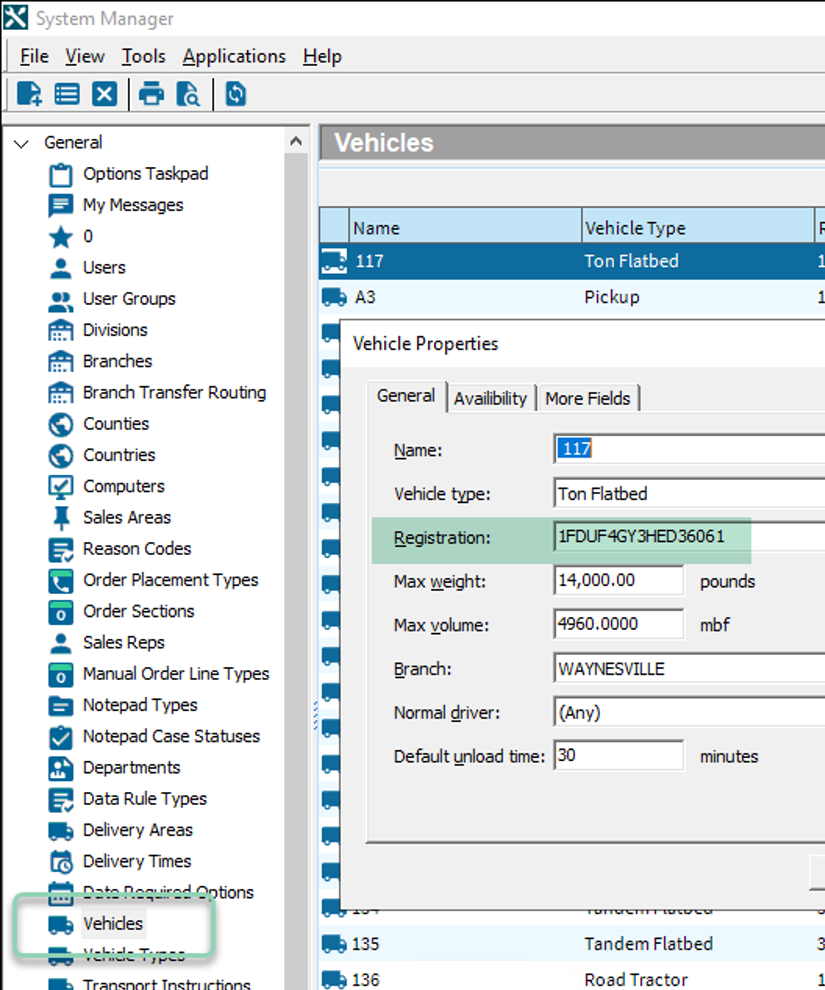
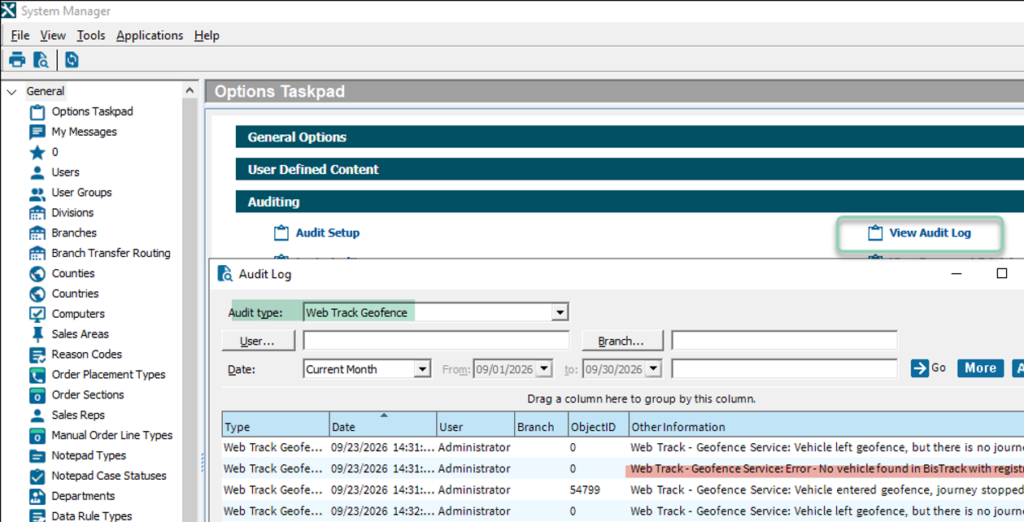
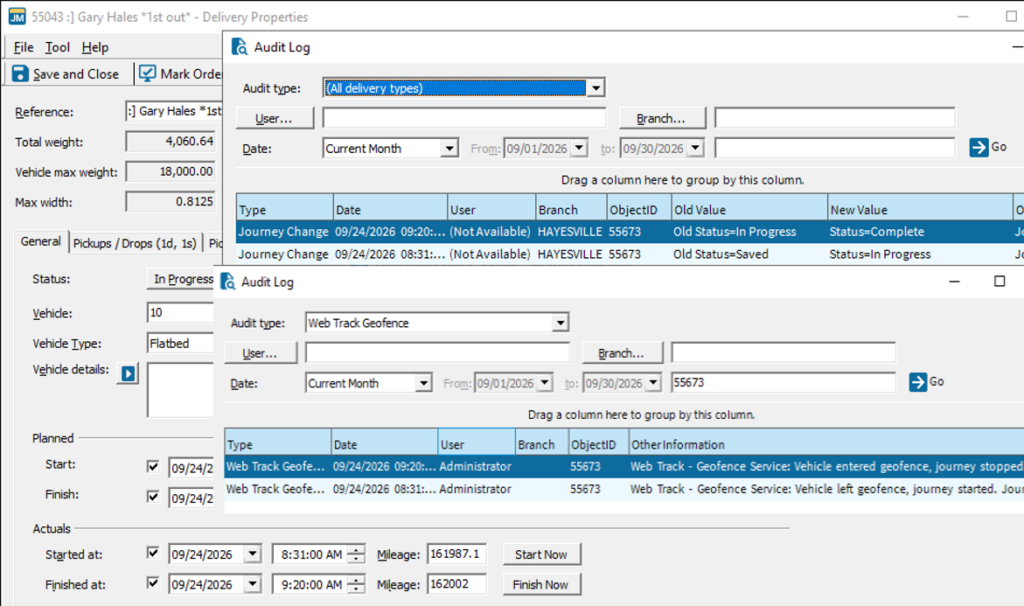


 next to the site.
 [post_title] => Customer Sites
[post_excerpt] => Customer sites provides an API functionality that allows you to embed the HTML for a map with specific vehicle groups and/or landmarks on your own web server for visibility outside of the portal.
[post_status] => publish
[comment_status] => closed
[ping_status] => closed
[post_password] =>
[post_name] => using-customer-sites
[to_ping] =>
[pinged] =>
[post_modified] => 2025-07-30 09:27:00
[post_modified_gmt] => 2025-07-30 16:27:00
[post_content_filtered] =>
[post_parent] => 545
[guid] => http://gpsihelp.wpengine.com/?post_type=documentation&p=1338
[menu_order] => 2
[post_type] => documentation
[post_mime_type] =>
[comment_count] => 0
[filter] => raw
)
[3] => WP_Post Object
(
[ID] => 24732
[post_author] => 12
[post_date] => 2022-04-20 09:27:50
[post_date_gmt] => 2022-04-20 16:27:50
[post_content] =>


 In the Vehicle List menu, click the Fuel Card checkbox, then click the filter button.

 Leave Optional Filters: None and click the Search button.
 For a Fuel Card in the list, paste the previously copied VIN into the VIN field with the keyboard shortcut Ctrl+V, or right click and select Paste.
 [well type="well"]
 The session token doesn’t change, but it could expire eventually. The token is based on your user credentials and your IP address, so if you don’t change those it will always be the same token. The reason you’re not seeing it expire is because we’re using a Least-recently-used expiration policy on those tokens.
Basically, if you keep using it consistently, it won’t expire unless a lot of other tokens have been used more recently than yours. If you use it consistently, you may never see it expire. It’s still a good practice to run userauth/login before a batch of operations and/or be responsive to an authentication exception, so you can login again if/when you need to.
[post_title] => Why doesn't my API session token expire?
[post_excerpt] => The API documentation indicates that the session token will eventually expire, but this does not appear to be happening for me. Why not?
[post_status] => publish
[comment_status] => closed
[ping_status] => closed
[post_password] =>
[post_name] => why-doesnt-my-api-session-token-expire
[to_ping] =>
[pinged] =>
[post_modified] => 2019-06-05 15:36:36
[post_modified_gmt] => 2019-06-05 22:36:36
[post_content_filtered] =>
[post_parent] => 0
[guid] => http://help.gpsinsight.com/?post_type=deepdive&p=3005
[menu_order] => 0
[post_type] => deepdive
[post_mime_type] =>
[comment_count] => 0
[filter] => raw
)
)
[post_count] => 3
[current_post] => -1
[before_loop] => 1
[in_the_loop] =>
[post] => WP_Post Object
(
[ID] => 2998
[post_author] => 12
[post_date] => 2016-07-20 21:20:07
[post_date_gmt] => 2016-07-21 04:20:07
[post_content] =>