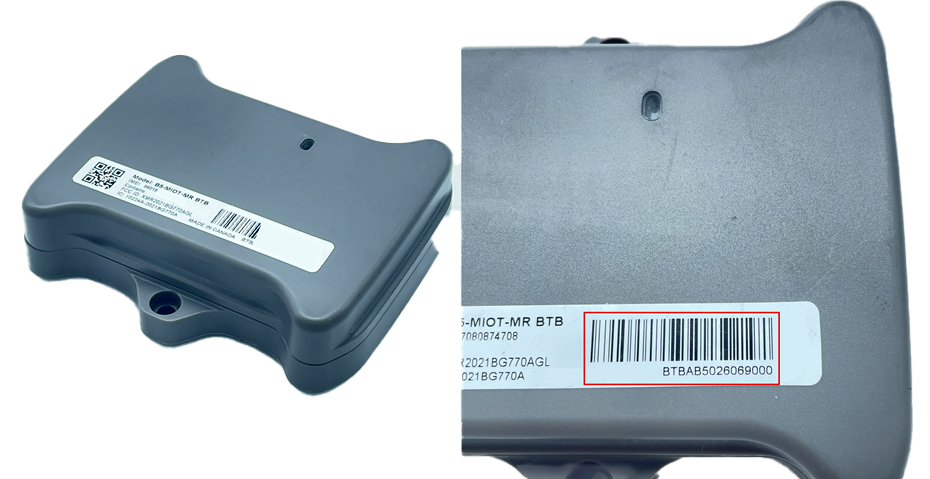
For best results, register this device type as an Asset. If registered as a Vehicle, trip data accuracy may be impacted due to the lack of a direct ignition connection.
Before You Begin
The installation kit contains a registration card, the BeBatt series device, two (2) well nuts with screws, and two (2) self-tapping screws.
Additional tools and supplies you may need include a fine-tip marker, centerpunch, and a ladder.
For device activation and registration, obtain the Install Key from your GPS Administrator and bookmark the Verify GPS Web App (https://verifygps.gpsinsight.com) on your smartphone.
Installation Overview
The following steps provide an overview of the installation process:
- Installation Preparation
- Device Mounting
- Activation and Registration
Installation Steps
1. Installation Preparation
- Complete the registration card by locating the 19-digit serial number.
- Identify a suitable mounting location that is horizontal to the ground, has an unobstructed view of the sky, is not a removable panel, and will not be damaged during normal operations.
- Inspect the area directly beneath the mounting location to ensure nothing will be damaged during installation.

Covert Installation: Though the device may report accurately in covertly installed locations, we do not recommend this type of installation due to the potential for lost data and/or diminished battery life.

2. Device Mounting
- Position the mounting bracket and mark the position of the two holes.
- Secure the device to the asset with screws.
2. Activation and Registration
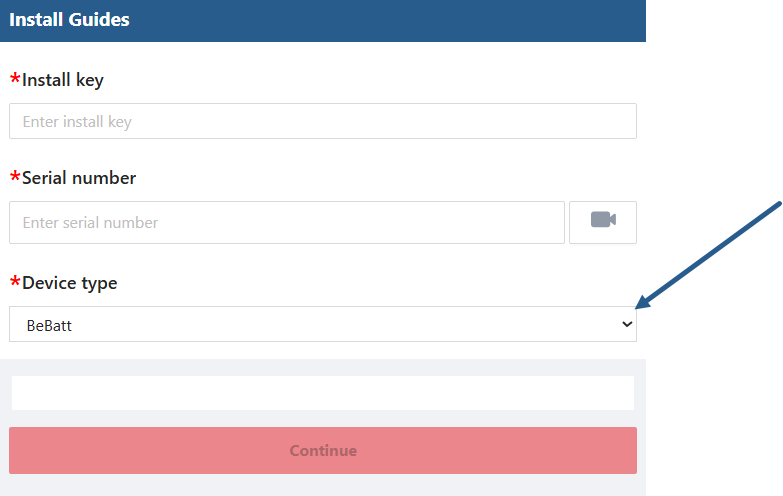
- Open the GPS Insight VerifyGPS Web App via your smartphone or computer, then enter the following information and follow the prompts to register the device.
- Enter your Install Key.
- Enter the Device Serial Number.
- Select Device Type: BeBatt.
- Click ‘Next’ and follow the prompts to verify and register the device.
- Upon successful registration, give the registration card to your GPS administrator.
- Open the GPS Insight VerifyGPS Web App via your smartphone or computer, then enter the following information and follow the prompts to register the device.